
How do I open an app grid with a three-finger pinch?
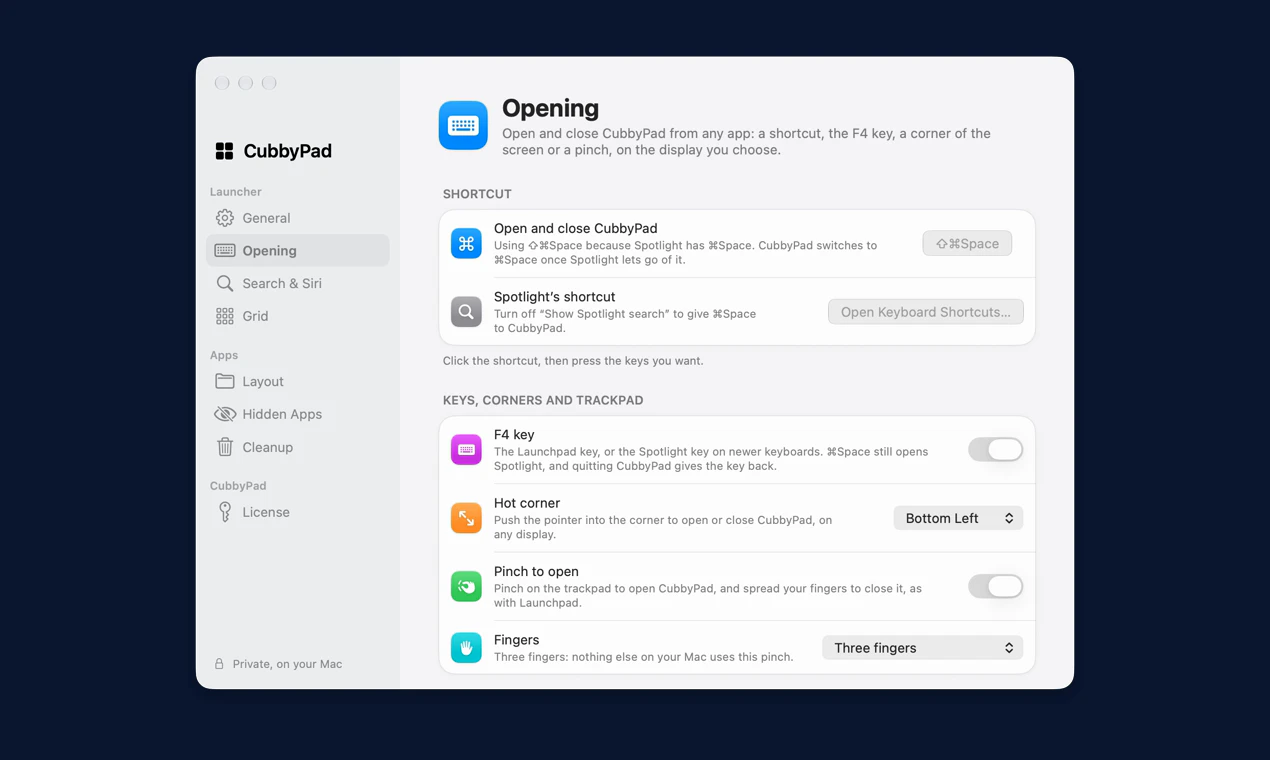
In Relaunch, open Settings › Opening, enable Pinch to open and choose Fingers › Three fingers. Bring three fingertips together on the trackpad to open the grid; spread them to close it. Relaunch must be running. It requires macOS 26 Tahoe or later.
This opens Relaunch’s grid alongside the built-in Spotlight Apps view. It does not restore Apple’s removed Launchpad application. You can keep Command–Space assigned to Spotlight and use Shift–Command–Space for Relaunch.
Choose the gesture your hands can repeat
A three-finger pinch draws three fingertips together on the trackpad. That is different from bringing a thumb and three fingers together. Mixing those movements is an easy reason for the wrong app view to appear.
In Relaunch, open Settings › Opening and enable Pinch to open. The Fingers setting lets you inspect the chosen gesture. The three-finger choice keeps it separate from the thumb-and-three-fingers motion associated with Apple’s app browsing.
Test opening and closing as a pair
- Make sure Relaunch is running.
- Enable Pinch to open and choose the three-finger option.
- Draw three fingertips together to open the grid.
- Spread them to close it, then test again from an ordinary app window.
Resolve a gesture overlap before changing layouts
If another view opens, check the Fingers setting and the actual movement you are making. Try Relaunch’s keyboard shortcut to establish whether the grid itself opens correctly. A gesture conflict does not mean your app pages are damaged or missing.
Is a three-finger pinch the same as a swipe up?
No. A pinch brings fingertips toward one another; a swipe moves them in the same direction. A three-finger swipe up may open Mission Control, depending on your macOS Trackpad settings. Check System Settings › Trackpad › More Gestures to see your own assignments.
If Relaunch opens during a system swipe, try Fingers › Thumb and three fingers in Relaunch instead. That gesture can overlap with the system Apps view, so test which choice works with your current macOS gestures. There is no need to change your folders or reinstall the app.
Use a mouse or keyboard when it suits you
A pinch is optional. F4, a recorded shortcut, a hot corner, the Dock and the menu bar are other opening methods. At a desk with an external mouse, a keyboard shortcut may be easier than reaching for a trackpad. You can keep several methods available.